
Course Description
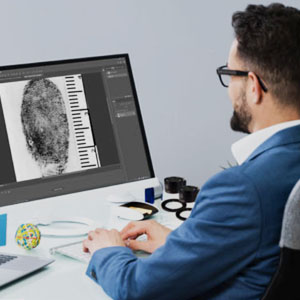
Are you using Photoshop to enhance digital evidence in your casework?
Are you using Photoshop's many tools and techniques to the best of their ability?
Are you confident in your ability to use Photoshop as a Latent Print Examiner?
In this online course, your instructor, Matt Marvin, CLPE, CFWE, will share his many years of experience and expertise applying digital imaging to latent print evidence using Photoshop.
This course is designed for latent print examiners of all levels. If you have little to no knowledge of Photoshop…this course is for you. If you have been using Photoshop for years…then this course is for you. Anyone who uses Photoshop to make side-by-side comparisons can and will benefit from completing this online course.
BUT THIS ONLINE COURSE ISN’T JUST FOR LATENT PRINT EXAMINERS!
If you work in Photoshop, you can benefit from the instruction and exercises contained in this online course.
In this course, Matt will demonstrate and teach you to:
- Configure your Photoshop so that it is optimized for working with digital latent print evidence.
- Use image orientation techniques such as duplication, rotation, and canvas flip.
- Properly draw lines and arrows, drop dots, and insert text.
- Use the selection tools and invert images.
- Use basic enhancement techniques such as working with levels, shadows, and highlights.
- Apply area-specific enhancements such as dodge and burn.
- Use color-based enhancements such as color modes, color channels, black-and-white adjustments, selective color, and color subtraction.
- Work with fine details by using sharpening techniques and tools.
- Use calculations to enhance your digital evidence.
- Calibrate images in two steps using rulers and image size.
- Correct perspective when images are not taken on a level plane.
- Use a scanner and scanner enhancement tools to capture digital evidence.
As you can see, you will learn some of the very best tools Photoshop has to offer. Not only will you learn the function behind each of these tools and how to use them, but you will also learn how each of them applies directly to working with digital impression evidence.
All of these tool sets will be accompanied by exercises to help you hone your Photoshop skills and apply what you have learned.
This course teaches a tool and then builds on that tool as you progress through the course. You get world-class instruction that teaches you professional techniques and shortcuts. Mastering these tools and techniques can save hours of time and frustration when using Photoshop and working with digital impression evidence.
**THE COURSE INSTRUCTION AND DEMONSTRATIONS USE ADOBE PHOTOSHOP CC. WE RECOMMEND YOU USE THE LATEST VERSION OF ADOBE PHOTOSHOP CC. AN OLDER VERSION MAY SUFFICE, BUT THE MENUS, TOOLS, AND OPTIONS MAY NOT BE IN THE SAME ORDER OR LOCATION AS INSTRUCTED.
Target Audience
This course is designed for Latent Print Examiners and other impression evidence examiners, but it can also benefit many others outside the role of an LP Examiner. From the beginner who is new to Photoshop or experienced examiners who are looking to hone their Photoshop skills.
Course Logistics
Course Objectives
- Module 1 – Preferences and Workspace
- Preferences
- Workspace Arrangement
- History Tracker and increase history states
- History Tracker Exercise 1
- Module 2 ‐ Image Orientation
- Image Duplication
- Image Duplication Exercise 1
- Image Rotation / Resolution
- Rotation Exercise 1‐3
- Canvas Flip
- Rotation Exercise 1
- Image Duplication
- Module 3 ‐ Drawing Lines and Arrows, Dropping Dots, and Text
- Drawing Lines and Arrows, Dropping Dots, and Text Exercise 1
- Module 4 – Inversion and Selections
- Inversion
- Inversion Exercise 1
- Selections
- Module 5 – Basic Enhancements
- Levels
- Levels Exercise 1‐4
- Shadows and Highlights
- Shadows and Highlights Exercise 1‐3
- Inversion
- Module 6 – Area Specific Enhancements
- Dodge
- Dodge Exercise 1‐3
- Burn
- Burn Exercise 1‐3
- Dodge & Burn Exercise
- Dodge
- Module 7 – Color-Based Enhancements
- Color Modes
- Color Modes Exercise
- Color Channels
- Color Channels Exercises 1‐3
- Black and White Adjustments
- Black & White Exercises 1‐3
- Selective Color
- Selective Color Exercises 1‐3
- Color Subtraction
- Color Range Exercise 1‐3
- Color Modes
- Module 8 – Fine Details
- Sharpening Techniques
- Sharpening Exercises 1‐3
- Noise Removal
- Noise Removal Exercises 1‐3
- Module 9 – Calculations
- Calculations Exercise 1‐3
- Module 10 – Image Calibration and Rulers
- Calibration Exercises 1‐3
- Sharpening Techniques
- Module 11 – Perspective Correction
- Perspective Correction Exercises 1‐3
- Module 12 – Scanners
- Final Combined Practical Exercises
- Written Exam
Training Certification and Recertification Credits
Common Sense Digital Imaging for Latent Print Examiners may qualify for specific continuing education training credits. Use's summary below as a quick reference for organization and discipline specific applicability. The approving organization has final authority and their website should be referenced before submitting any request for training credits.
International Association for Identification (I.A.I.) Latent Print Certification Board Approved for 16 Certification Credits
International Association for Identification (I.A.I.) Latent Print Certification Board Approved for 16 Re-Certification Credits